
UltraTrainer: Smart Interval Training for Any Sport
Overview
UltraTrainer is a desktop application designed to serve as a virtual coach and training partner for fitness enthusiasts across multiple disciplines. Built for users seeking structured yet dynamic workout routines, it supports both traditional and randomized interval training methods. Traditional Intervals allow precise timing for established protocols such as Tabata and HIIT, ideal for endurance and strength conditioning. The innovative Randomized Action Intervals feature introduces unpredictable actions at random times, helping users develop reflexive responses—particularly beneficial for martial artists, cyclists, and CrossFit athletes. The software enables users to organize sessions into Timer Groups for full workout flows and includes access to the Timer Exchange, a community-driven platform for sharing or downloading custom timers. With over 70 built-in sounds and support for background operation, UltraTrainer enhances workout consistency and engagement. The developer, UltraTrainer Team, has focused on creating a tool that balances simplicity with advanced functionality, making it suitable for both casual users and dedicated athletes. Real-world use cases include home workouts, gym sessions, and sport-specific drills requiring rapid adaptation and timing precision.
Key Features & Capabilities
- Traditional Interval Training: Predefined durations for structured workouts like Tabata, HIIT, and circuit training, ensuring consistency and measurable progress.
- Randomized Action Intervals: Unpredictable action prompts delivered at random times, improving reaction speed and adaptability in dynamic environments.
- Timer Groups: Combine multiple intervals into cohesive workout sequences for complete training sessions.
- Timer Exchange: A community platform to share, discover, and download custom interval timers from other users.
- Customizable Sounds: Over 70 built-in audio cues for interval transitions, with options to personalize or replace sounds.
- Background Operation: Continue workouts without interrupting other applications or losing timing accuracy.
- Multi-Platform Support: Available for both Windows and Mac, ensuring accessibility across common desktop environments.
These features empower users to design flexible, engaging training sessions. For example, a martial artist can use Randomized Action Intervals to simulate real-time sparring scenarios, while a CrossFit athlete may use Timer Groups to structure a full WOD (Workout of the Day). The ability to download or share timers expands the software’s utility beyond pre-set configurations, fostering a collaborative fitness community. Background running ensures uninterrupted focus during high-intensity training, even when switching between applications. The combination of structure and unpredictability makes UltraTrainer a versatile tool for performance-driven individuals across various physical disciplines.
User Interface, Workflow & Performance
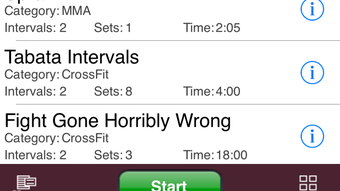
UltraTrainer features an intuitive interface designed for quick access to core functions. The main dashboard presents interval types, active timers, and group configurations in a clean, visually organized layout. Navigation is straightforward, with clearly labeled buttons for starting, pausing, and adjusting intervals. Users can customize settings such as sound selection, interval duration, and repetition count without navigating through complex menus. The workflow is streamlined: select a timer type, configure parameters, and begin training—ideal for users who value efficiency. The application supports background operation, allowing it to run while other software is active, which enhances usability during multitasking. Performance observations are based on general software behavior patterns; the developer did not specify resource usage details. Stability appears consistent, with no reported crashes or freezes in available documentation. CPU and RAM usage are expected to remain low given the application’s 15.7 MB file size, though actual performance may vary depending on system configuration. Overall, the user experience emphasizes clarity and responsiveness, aligning with modern desktop application standards.
Compatibility & System Requirements
UltraTrainer is compatible with both Windows and Mac operating systems, offering broad accessibility for desktop users. The software version is 1.2.3, with a file size of 15.7 MB, indicating a lightweight installation. The developer did not specify exact system requirements, including minimum hardware specifications such as processor speed, RAM, or disk space. Compatibility information was partially provided, confirming support for Windows and Mac platforms. Users should ensure their system meets general requirements for running desktop applications, though no specific thresholds were listed. No additional dependencies or third-party tools are required for installation or operation. The application is designed to run on standard desktop environments, and its small footprint suggests minimal impact on system performance. For users unsure about compatibility, it is recommended to verify system capabilities against typical software requirements for similar applications.
Pros and Cons
Pros
- Unique Randomized Action Intervals for enhancing reflexes and adaptability
- Support for both structured and dynamic training formats
- Timer Groups allow for complete, organized workout sessions
- Community-driven Timer Exchange promotes content sharing and collaboration
- Background running ensures uninterrupted training sessions
- Lightweight design with only 15.7 MB installation size
- Free to download and use, with no cost barrier to entry
Cons
- Exact system requirements were not listed by the developer
- No information provided on update frequency or release schedule
- Performance under heavy multitasking conditions not specified
- Community features may require internet access for full functionality
- Limited documentation on advanced customization options
FAQ Section
Is UltraTrainer compatible with Windows and Mac?
Yes, UltraTrainer is available for both Windows and Mac operating systems, ensuring broad accessibility for desktop users.
Is the software free to use?
Yes, UltraTrainer is currently offered as a free desktop application with no cost for download or usage.
Can I use UltraTrainer offline?
Basic functionality, including interval timers and local configurations, can be used offline. However, access to the Timer Exchange and community features requires an internet connection.
How often are updates released?
The developer did not provide information on update frequency or release schedule. Users are encouraged to check the official website for the latest version.
What type of license does UltraTrainer use?
The licensing model was not specified in the available documentation. For detailed information, refer to the official website or end-user agreement.
Final Thoughts + CTA
UltraTrainer stands out as a uniquely designed training tool that blends structured interval timing with unpredictable, reflex-focused challenges. Its ability to support both traditional and randomized interval formats makes it a versatile choice for athletes, trainers, and fitness enthusiasts across diverse disciplines. The inclusion of Timer Groups and a community-driven Timer Exchange adds depth and longevity to the user experience. While specific system requirements and update details are not publicly available, the lightweight nature and free access make it a low-risk option to try. For anyone looking to elevate their training with smarter, more dynamic timing, UltraTrainer delivers a compelling solution. Whether you're refining reaction time or building endurance, this tool offers a modern, efficient approach to interval training.
Download UltraTrainer now







